
Smart vehicleTested on 6 models from 6 brands

EVSense

Plug into the USB port you already have and see deeper into your EV battery. The EVSense box plugs into the car's head-unit USB port and runs on screen through the car's Apple CarPlay. You get live EV data, and EV Guardian watches the health of the high-voltage battery, with an on-screen and audible alert when something looks wrong.
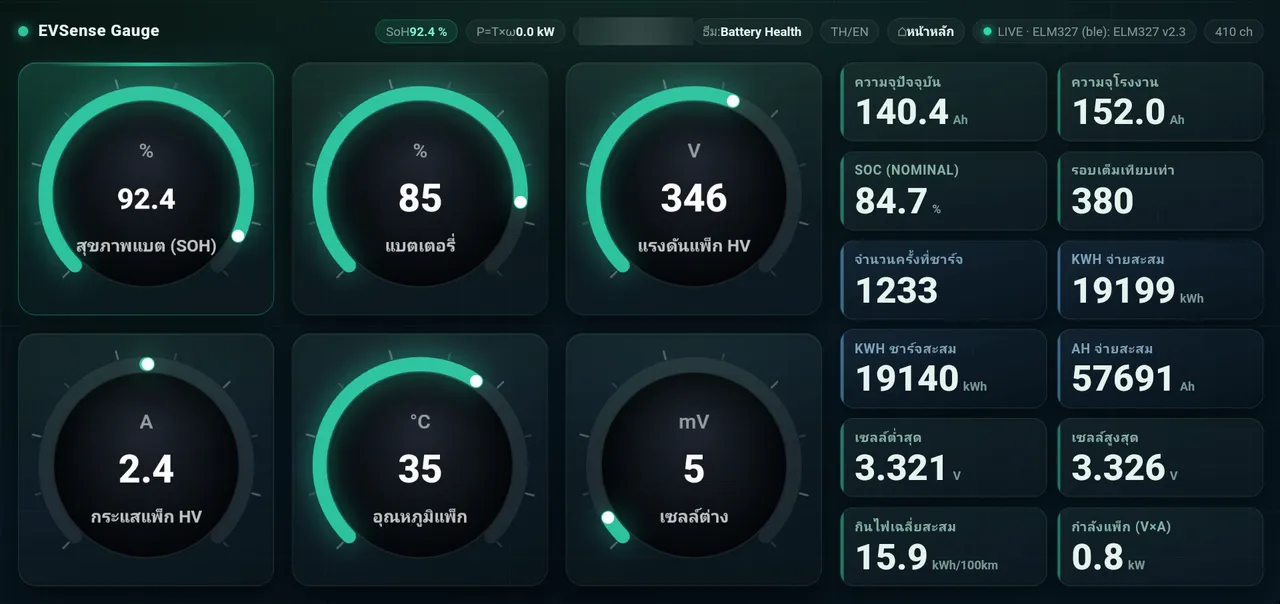
No new head unit, no wiring · read-only, it never controls the car

EVSense Gauge on the car screen: battery health 92.4%, battery 85%, pack voltage 346 V, pack temperature 35 °C and cell spread 5 mV
A real EV Gauge screen from a BYD Dolphin

One box, three jobs

It uses the USB port your car already uses for CarPlay. On an EV you also plug in the OBD dongle that comes in the box.
Apple CarPlay through your head unit · free
The EVSense screen appears on the car display through CarPlay, wired, and wireless on tested models
EV Gauge · free
Live EV data on the car screen, such as battery level, power and temperature, read from a Vgate OBD dongle over Bluetooth
EV Guardian · membership
Watches high-voltage battery health and sends a weekly email report · danger-level alerts are free on every box
Works without internet
Processing happens in the box, so danger alerts fire immediately · the internet is only used to check membership and send reports; membership keeps working for 14 days offline
  1. Vgate OBD dongle (OBD-II port)
  2. Bluetooth
  3. EVSense box
  4. USB · CarPlay
  5. Your car screen

EV Guardian watches four things you want to know early

  • Cell voltage spread (ΔV) A cell drifting far from its neighbours is often the first sign of a weak cell or poor balancing
  • Battery temperature Too hot, or uneven between sensors, while driving or fast charging
  • Insulation resistance Falling insulation between the high-voltage system and the car body is a safety matter worth knowing early
  • SOH trend Battery state of health as the car reports it, shown as a weekly trend line
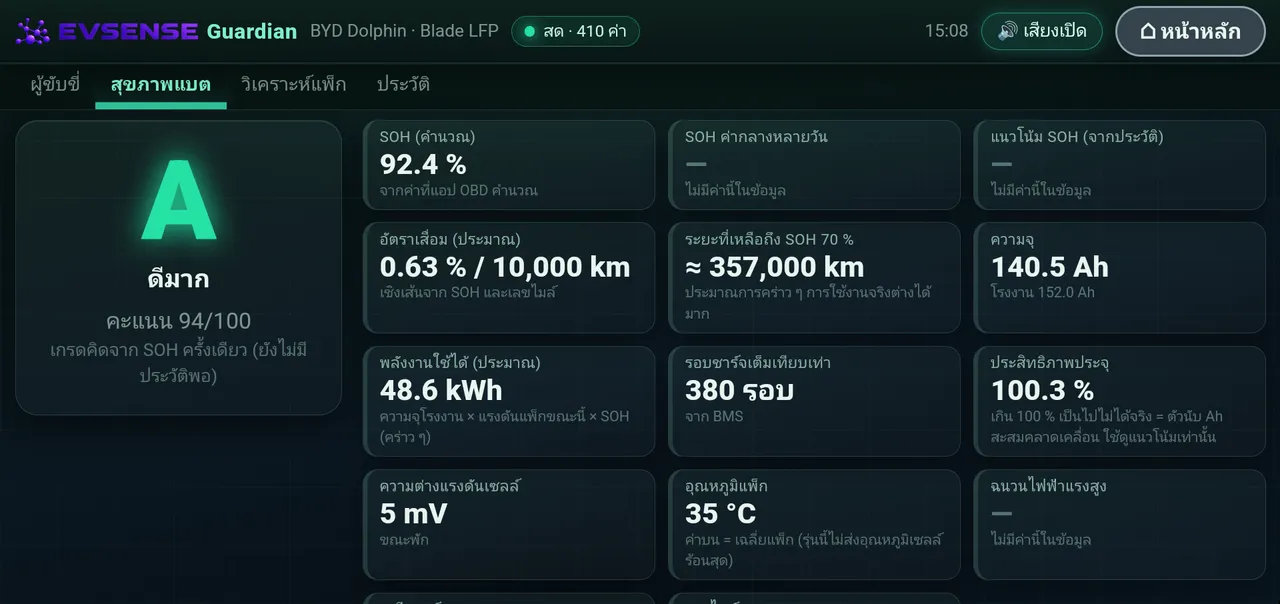
EV Guardian battery health tab: grade A, score 94/100, SOH 92.4%, cell voltage spread 5 mV, pack temperature 35 °C
Battery health summarised as a grade
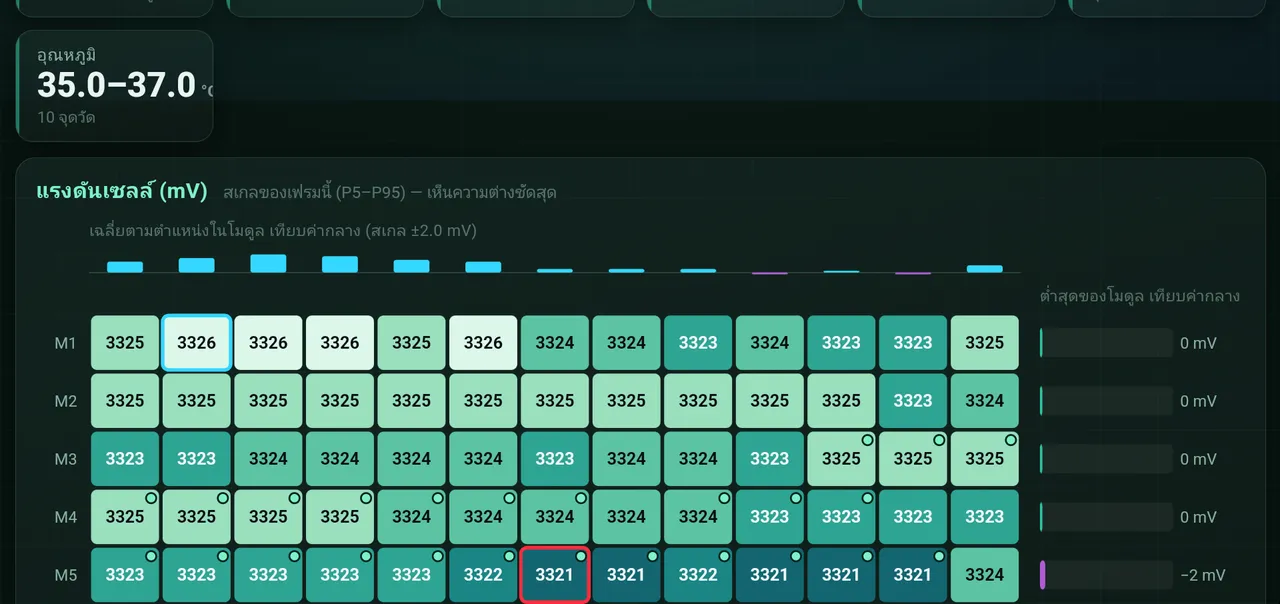
Per-cell voltage map across 5 modules, highlighting a cell lower than its neighbours
Per-cell voltage map (on cars that report individual cells)

Basic safety costs nothing extra

The box comes in 32 GB and 64 GB · prices to be announced, see evsense.app for the latest

Free · included with the box

0 THB

  • Apple CarPlay through your existing head unit
  • EV Gauge, live EV data on the car screen
  • Danger-level alerts on screen + sound

EV Guardian membership

30-day free trial per box

  • Everything in Free
  • Alerts at every level, with advice on what to do next
  • Battery health history and SOH trend
  • Cell map (on cars that report individual cells)
  • Weekly battery health report by email + PDF, and an instant email when something looks wrong

Cars tested with EVSense

Only models we have actually tested are listed; not every car is supported yet. The head unit must already support Apple CarPlay · results as of 20 October 2026

Car / head unitWired CarPlayWireless CarPlayEV dataStatus
BYD Dolphin✓✓✓Working
Geely EX2✓·✓Partial / improving
Omoda C5 EV✓·✓Partial / improving
Ford SYNC 3✓·—Working
Toyota CarPlay head unit (1 model tested)✓·—Partial / improving
Mitsubishi Pajero Sport✓·—Working

✓ = tested and working · · = not tested yet · — = not an EV · details per model at evsense.app

Install it yourself, no wiring

  1. Check your car is on the tested list

    If it is not, ask before you buy. We will tell you honestly whether it has been tested.

  2. Plug the box into the USB port used for CarPlay

    If your car has several ports, check the car manual for the one that supports CarPlay

  3. Plug the Vgate OBD dongle into the OBD-II port (EVs only)

    It is usually under the dashboard on the driver's side

  4. Start the car and follow the setup wizard on screen

    The first start takes about a minute. Set the language, Wi-Fi (with your phone's help), car model, Vgate pairing and report email

Full installation guide at evsense.app

Limitations you should know

  • EV Guardian helps you monitor and get alerts. It is not a certified safety device. The car's BMS and dashboard warning lights remain the primary protection.
  • SOH is the value the car reports, not something EVSense measures itself · reports are not battery condition certificates
  • EVSense only reads data and never controls the car · not every car is supported yet

Apple and CarPlay are trademarks of Apple Inc. · Car brand and model names are used only to indicate compatibility. EVSense is not affiliated with, sponsored or endorsed by Apple Inc. or the car makers mentioned.

Questions about EVSense

Sign up, read the manual and the FAQ at evsense.app, or contact the EVSense team directly.